Automated HR & Payroll Communications via Power Automate
A series of Power Automate flows generate and distribute emails for selected HR and Payroll activities based on system events or scheduled processes. This is an automatic process developed within the HR & Payroll system (Resourcelink) to improve engagement and communication and at the same time increase efficiencies. The purpose is to increase engagement with new starts, managers and leavers by generating automatic email communications.
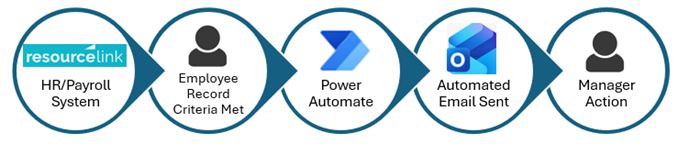
Why are we taking this step
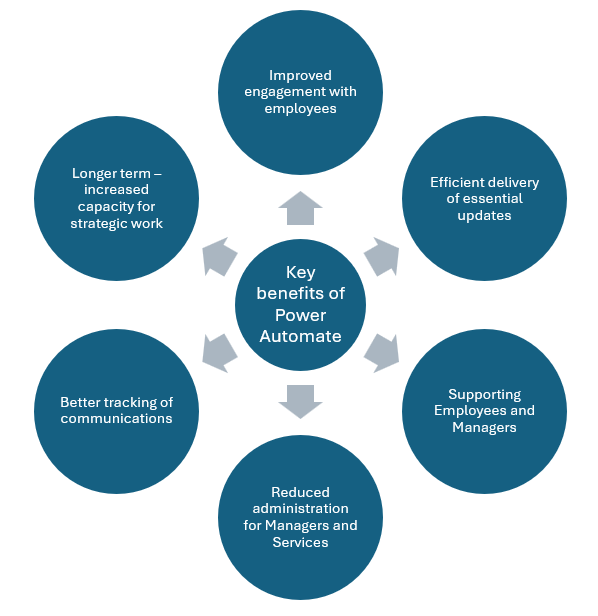
By adopting Power Automate, we are moving toward a more modern communication process that supports:
☑ Managers with efficient delivery of essential updates
☑ Managers with guidance on next steps for processes
☑ Improved engagement with employees
☑ Better tracking and auditability of communications
☑ More capacity for strategic work, employee support, and process improvement
Live email alerts
| Recipient | Purpose | |
|---|---|---|
| Day 1 Reminder | Managers | To remind managers of first‑day processes for new starts, eg checking them in on HRForms Plus to ensure a more consistent process for new starts and improve their experience. |
| Day 1 Welcome | Employees | To welcome new employees to Falkirk Council and provide additional useful information to improve engagement with our new starts and offer a more inclusive first day experience. |
| 7 Day Reminder | Managers | To remind managers of a new start 7 days in advance so they can begin onboarding, organise equipment, etc to improve the new start experience for our new starts. |
| Leaver | Managers | To advise a manager that a leave date has been entered and remind them of the exit process. |
| Leaver | Employees | To advise an employee that a leave date has been entered and encourage them to complete an Exit Interview. |
| Tax Code Change | Employees | To advise employees that their tax code changed in the previous month. |
| Abatement of Leave | Managers | To remind managers that an employee has been absent for 3 months and an abatement of leave may be required. |
| Open Ended Absence over 7 Days | Managers | To notify managers that an employee has an open ended absence that is over 7 days and will need corrected in MyView. |
| Work Related Absences | Managers | To remind managers of the process if an employee has been absent with a Work Related Absence. |
| Future Dates Sickness Absence | Managers | To notify a manager that they have created a future dated sickness absence for an employee that will need corrected. |
| Visa Expiry | Managers | To advise a manager when an employee's visa is due to expire with reminders 90,60,30 and 7 days from expiry. |
| Missing Equalities Data | Employees | To email employees that have a missing equalities characteristic to encourage them to update their details in MyView. |
Future email alerts
Additional flows will be introduced in phases as the automation framework expands. Work is already underway on further categories, including:
- Absence
- Employee absence trigger information
- Notifications of open-ended absences over 7 days and are self certified
- Return to Work processes
- Abatement of leave reminders
- Annual leave
- Balance reminders if insufficient leave booked/taken
Managing emails received in Outlook
Managers receiving higher volumes of notifications may wish to create rules to organise mail automatically. Emails to managers will be sent from ManagerAlerts@falkirk.gov.uk. This mailbox will be unmonitored however guidance on who to contact if there is a query is contained in the email.
Option 1: Create a Rule in Outlook (Desktop App)
- Create a new folder where emails will automatically go
- Right‑click any automated email received in your inbox
- Select Rules → Create Rule…
- Choose "From Manager Alerts"
- Select Move the item to folder
- Select the folder you have created and click OK
- Click OK to save the rule
Option 2: Create a Rule in Outlook on the Web
- Create a new folder where emails will automatically go
- Click the Settings (⚙) icon
- Choose Mail → Rules
- Select Add new rule and enter a name (eg Manager Alerts)
- Add the condition "From". In the box at the side type in Manager Alerts and select that mailbox
- In the "Add an Action" Select "Move to". Then select the folder you have created
- Tick "Run rule now"
- Click Save.